

Table of Contents
- What is Client-Side Rendering (CSR)
- What is Server-Side Rendering (SSR)
- CSR vs SSR Comparison
- How Google Actually Renders JavaScript
- The AI Search Angle: Why ChatGPT, Perplexity and LLM Crawlers Can’t See Your CSR Content
- How to Diagnose What Rendering Your Site Uses
- Core Web Vitals Impact by Rendering Method
- Decision Framework: Which Rendering by Page Type and Business Goal
- How to Fix a CSR Site Without a Full Rebuild
- Conclusion
- FAQs
Website rendering is where modern frontend architecture meets search visibility. Successfully aligning web development with SEO comes down to choosing how your site serves code to both human users and search engine bots. Today, developers rely on two primary rendering models: server-side rendering (SSR) and client-side rendering (CSR). Both of these play different roles and are used for different goals. Visitors expect a website to load quickly and function smoothly. Thus, “SSR vs CSR?” is a question that comes to the mind of every website developer and SEO strategist.
The following blog post goes through everything about SSR and CSR, from their definitions and meaning to their differences and much more. So if you are looking for more information on SSR and CSR, this blog is for you. Without wasting much time, let’s dive straight into it.
What is Client-Side Rendering (CSR)
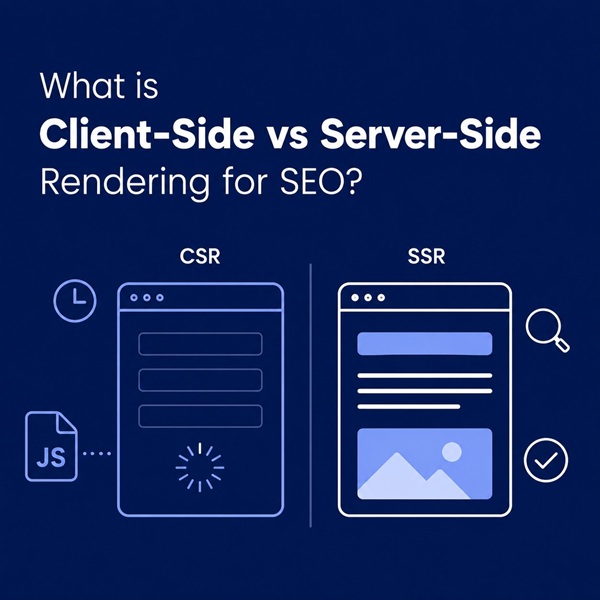
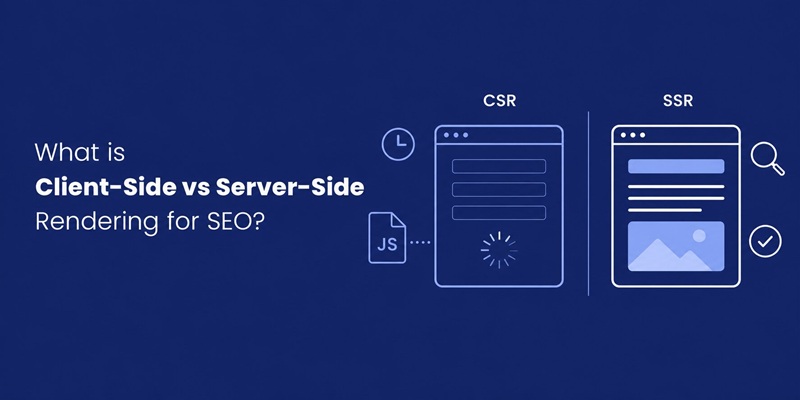
In CSR, the webpages are rendered by your browser. The browser loads the page quickly, but only the simple UI elements are loaded. It is often just an HTML file with links to JavaScript files. CSR is mainly used to create highly dynamic web applications where the content is frequently updated and does not require the page to load fully initially.
- The server sends a blank HTML page with CSS and JavaScript links to the browser.
- The browser processes it and constructs a Document Object Model (DOM) tree.
- The browser then downloads JavaScript and CSS and renders the webpage.
- The browser executes the JavaScript file to add dynamic elements like animations, form validations, and data from APIs.
- The browser re-renders and updates the webpage based on user interaction.
What is Server-Side Rendering (SSR)
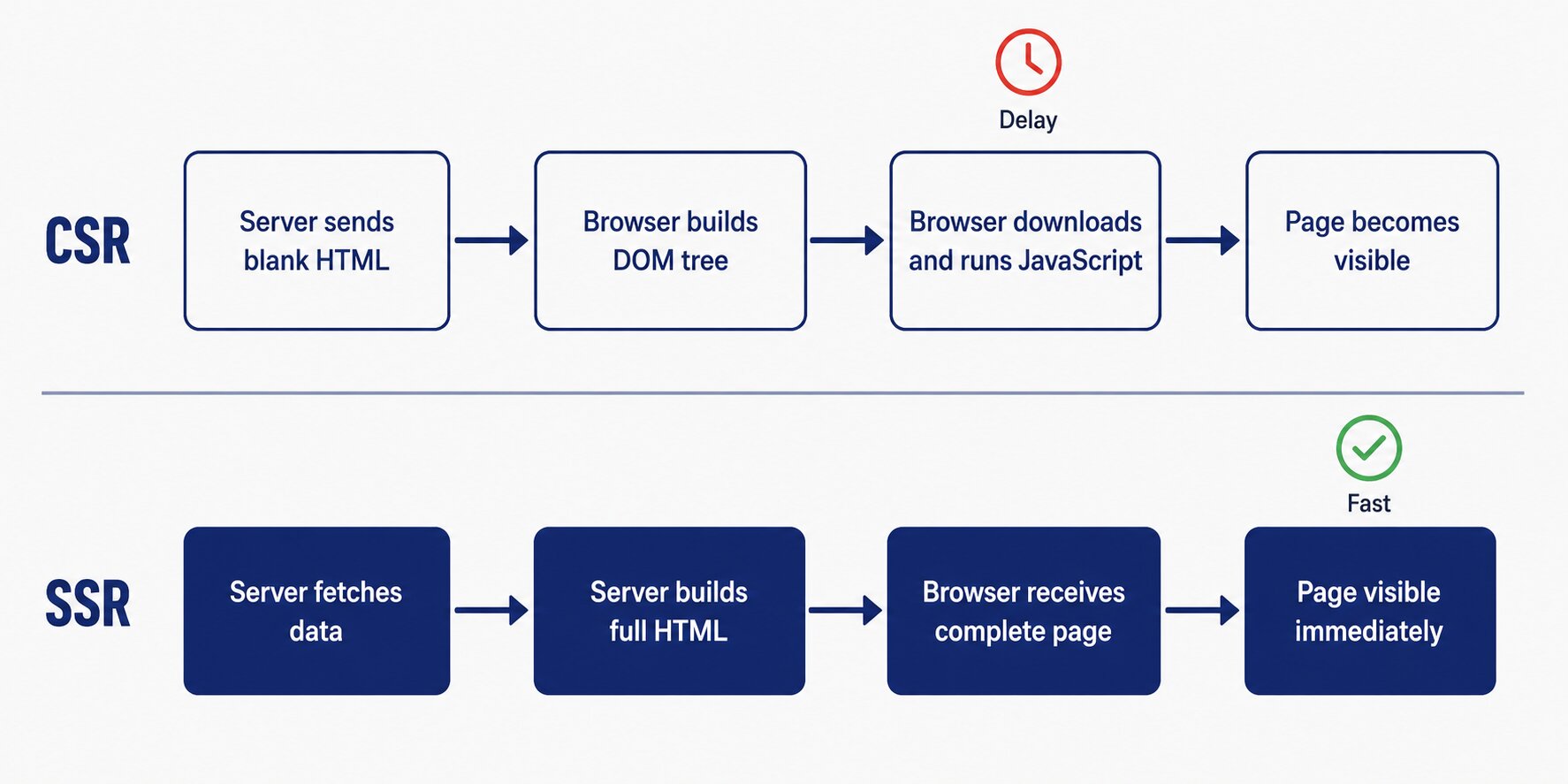
In SSR, the rendering process occurs on the server. Here, the server renders the entire HTML webpage with all the UI elements and sends it to the client’s browser. The browser shows the entire webpage without running any code on the client-side. Unlike CSR, which is a fairly new method of rendering, SSR has been used by developers for many years. SSR is ideal for e-commerce websites and landing pages.
- When a server receives a request for a webpage, it gets all the necessary data and adds that data to an HTML template.
- The server adds all the required content and CSS to the webpage.
- Once the rendering is complete, the server sends the fully rendered webpage to the browser for displaying. The browser does not need to execute any code, since everything is done by the server.
- For user interactions and updates, the client-side code handles the rendering and data fetching.
CSR vs SSR Comparison
| Client-Side Rendering | Server-Side Rendering | |
| Rendering | Occurs in the browser by using JavaScript | Occurs on the server |
| SEO | Search engine crawlers are unable to crawl and index the content easily | Search engine crawlers can easily crawl and index the content |
| Initial Page |
|
|
| Interactivity | After the initial load, the page is highly interactive, and the remaining UI is handled by the client-side without full page refreshes | The page has very limited interactivity initially, and the remaining UI rendering might require complete page refreshes |
| Use Cases | Perfect for SPAs, highly interactive applications (social networks, chat apps, etc.), internal apps, and dashboards | Perfect for websites that are content-heavy and websites that have limited interactivity like landing pages, e-commerce websites, blogs, and news websites. |
| Frameworks | React, Angular, Vue, Svelte, Backbone.js, and Ember.js are used | Next.js, Nuxt.js, Remix, SvelteKit, Angular Universal, Astro, and Qwik are used |
| Loading Speed | The loading speed is slow initially due to the fetching and parsing of all the JavaScript files | The loading speed is much faster as the entire HTML page is delivered as fully rendered |
| Server Load | There is very little server load because all the rendering occurs on the client-side in the browser | The server load is very high because all the rendering occurs on the server |
| HTTP Requests | Very few HTTP requests are made to the server | More HTTP requests are made to the server |
How Google Actually Renders JavaScript
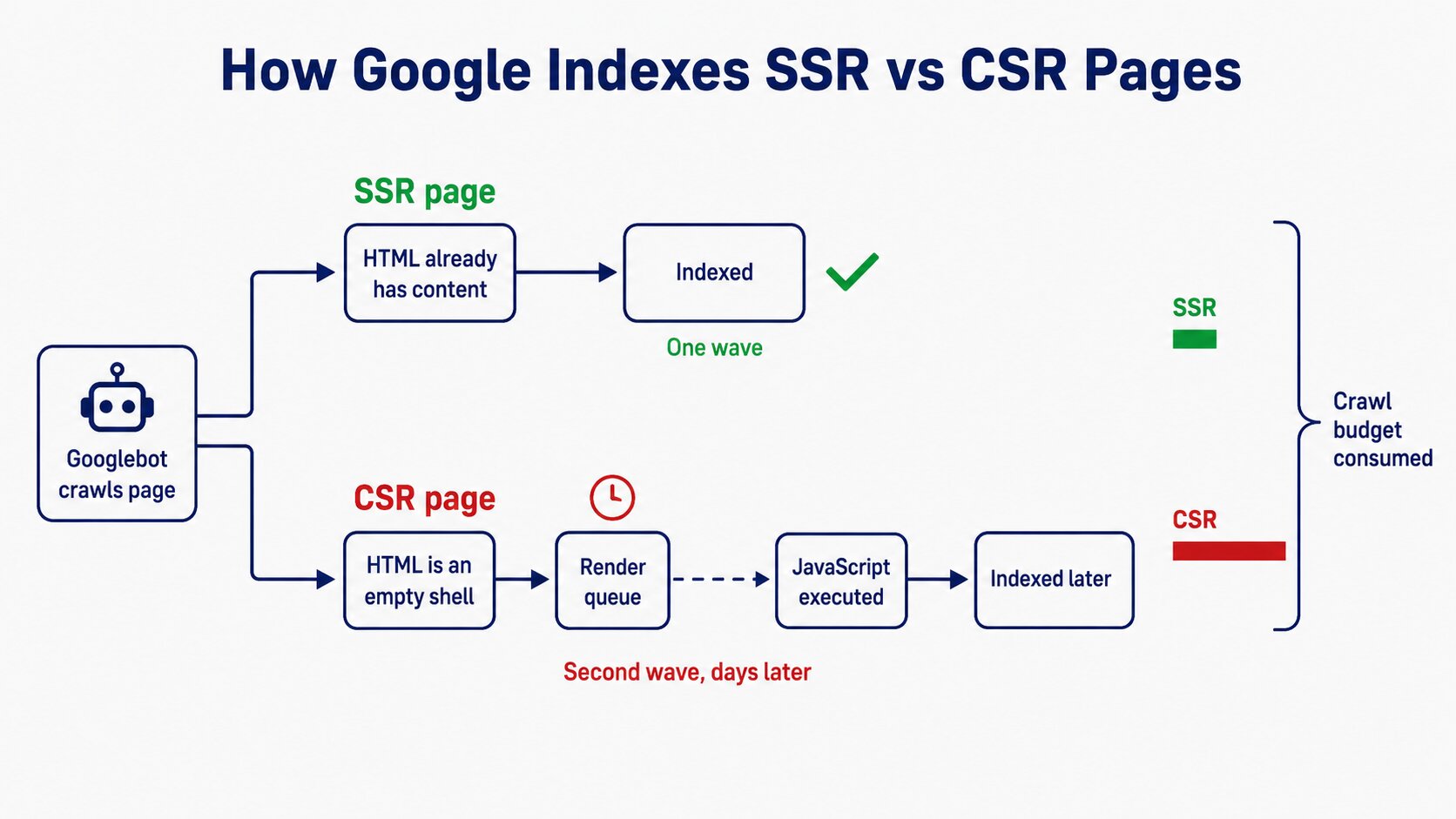
Google crawlers immediately start decoding the HTML response when they land on a webpage. Google crawlers can understand and index the page clearly only if most of the content is already rendered in that HTML.
In CSR, the initial HTML response is essentially a blank shell with script tags. To complete the website indexing process, Google must queue the page for a second wave of rendering to execute the JavaScript code and construct the full DOM. This additional step delays indexing and consumes extra crawl budget. As a result, the rendering may be slow, especially for large websites that have thousands of pages.
Relying entirely on CSR can lead to unnecessary delays, blocked resources, JavaScript errors, or crawl budget issues. All these things lead to poor SEO results. Hence, using SSR in SEO is a wiser decision than using CSR.
The AI Search Angle: Why ChatGPT, Perplexity and LLM Crawlers Can’t See Your CSR Content
Traditional engines like Google and Bing aren’t the only web crawlers harvesting your site anymore. AI search engines including ChatGPT, Perplexity, and Claude actively crawl pages to generate answers. Just as when optimizing content for Google AI Overviews, LLM crawlers heavily prioritize raw HTML because they do not spend resources executing heavy JavaScript bundles.
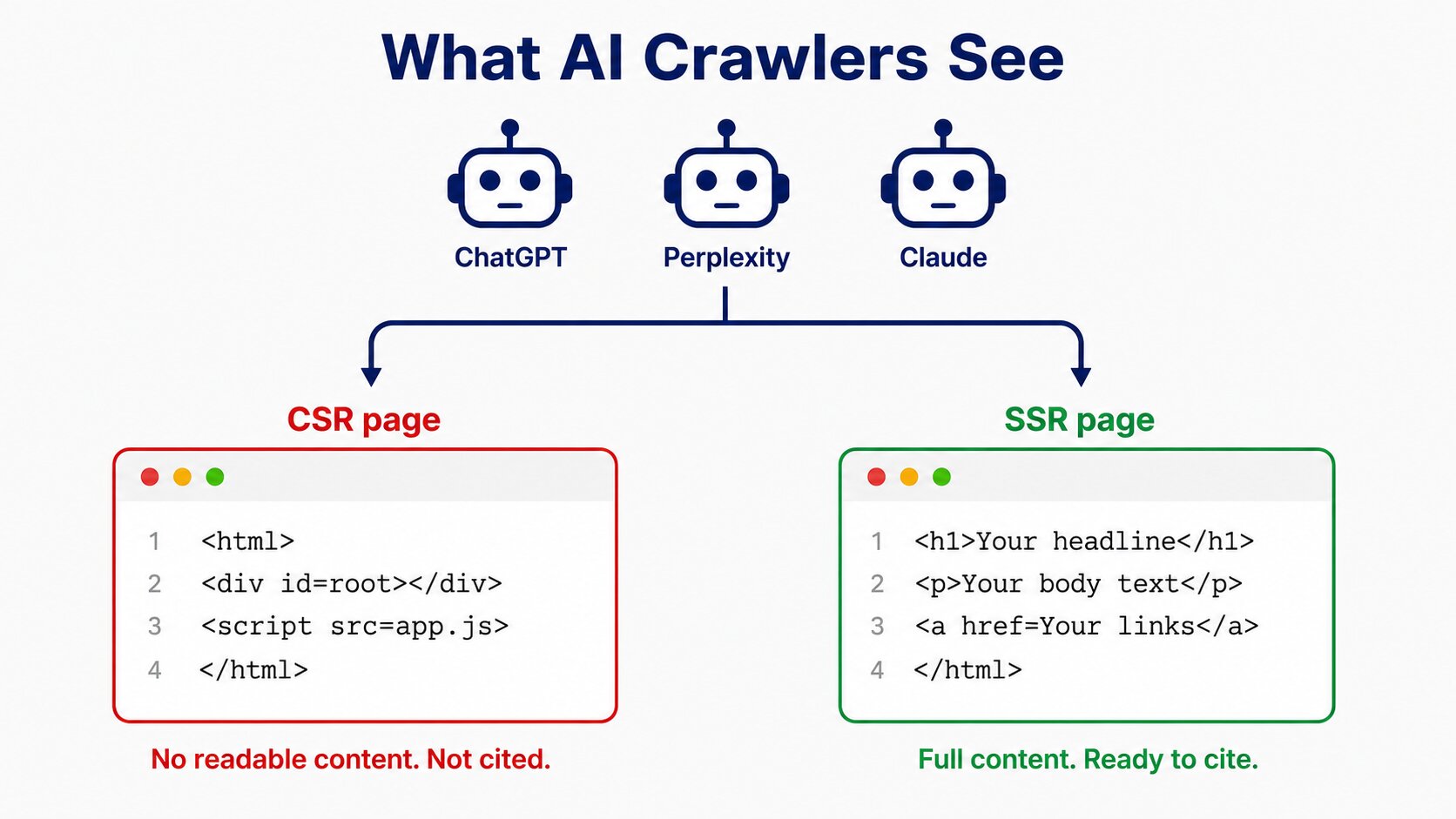
AI crawlers prioritise website loading speed and efficiency. These crawlers prefer to analyse the raw HTML rendered by the server rather than pages filled with JavaScript code. This makes it difficult for webpages using CSR to get cited in responses of AI search engines, because they will see an empty page.
AI search engines are expected to have a majority share in the search engine market in the coming years. This means if your website content is not visible without JavaScript, there’s a huge chance that it would not appear in AI-generated responses. Thus, JavaScript rendering in SEO is practically useless.
How to Diagnose What Rendering Your Site Uses
- If you can see your headings, body text, and links in the page source, your site likely uses server-side rendering.
- If the content disappears when you disable JavaScript and reload the page, your site depends heavily on client-side rendering.
- Use Google’s URL Inspection tool in Google Search Console to compare the crawled HTML with what users see in the browser.
- Run a technical SEO site audit using tools like Screaming Frog (switch between “Text Only” and “JavaScript” rendering modes) to uncover hidden rendering gaps between raw HTML and rendered DOM.
- Checking the technology stack can help you figure out the rendering method, as some are often set to client-side rendering while others support server-side rendering.
- If these checks return conflicting signals, which is common on sites running multiple frameworks or a CDN layer on top, an experienced SEO company in Ahmedabad can run a full render audit and tell you exactly which templates are reaching Google as empty shells.
Core Web Vitals Impact by Rendering Method
- Largest Contentful Paint (LCP): How quickly the main content becomes visible.
- Interaction to Next Paint (INP): How quickly the page reacts to user interactions.
- Cumulative Layout Shift (CLS): How much content unexpectedly moves during loading.
- First Contentful Paint (FCP): Time until the first piece of content appears on screen.
- Time to First Byte (TTFB): How quickly the server responds to the initial request.
- Total Blocking Time (TBT): How long JavaScript blocks the main thread during page load.
- Speed Index (SI): How quickly visible content is displayed during loading.
Decision Framework: Which Rendering by Page Type and Business Goal
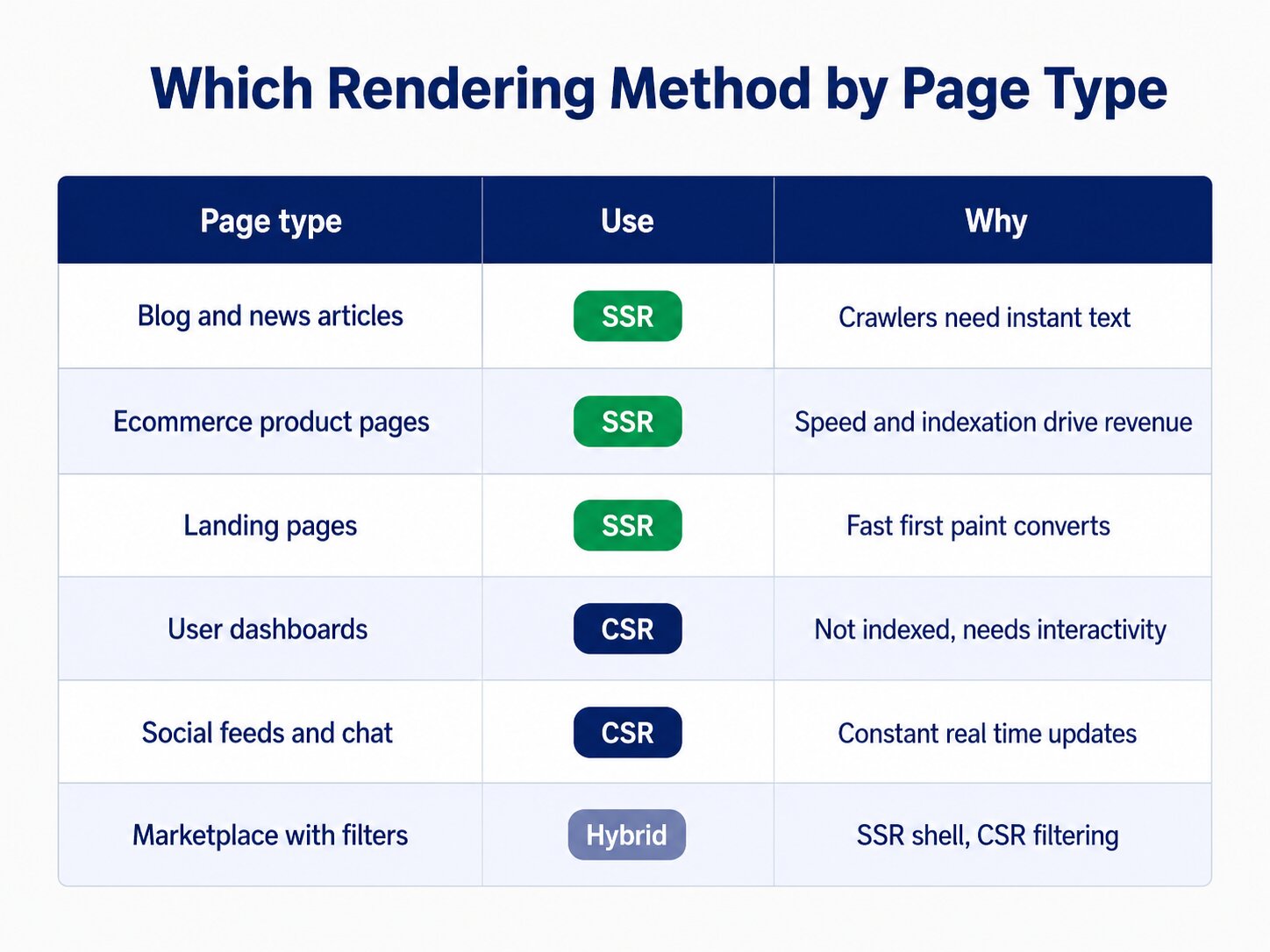
Choosing SSR or CSR can impact the performance of your website significantly. Let’s take a look at the use cases of each of them:
CSR Use Cases
Single-Page Applications (SPAs): For SPAs, CSR provides a seamless experience as it minimises server-side resources.
Highly Interactive Websites: Websites that are highly interactive, like social networking websites and online games, work great with CSR as it updates the content quickly without loading the page completely again.
Asynchronous Data Loading: CSR is perfect when the website or application requires different elements to be loaded at different times, like infinite scrolling on social network feeds.
SSR Use Cases
SEO-Focused Websites: Websites that rely on search engine rankings, like news platforms, blogs, and marketing websites, can benefit from using SSR.
E-Commerce Websites: By rendering product pages on the server-side rather than the client-side offers faster load times and improves accessibility.
Static or Landing Pages: Websites whose content is static or does not change very often can use SSR for the speed it provides in rendering pre-determined content.
How to Fix a CSR Site Without a Full Rebuild
Migrating a client-side rendered website to full server-side rendering often feels like rebuilding your entire codebase from scratch. If your application relies heavily on a JavaScript framework like React, Vue, or Angular, rewriting the core architecture is costly and time-consuming. Fortunately, you can fix client-side rendering SEO issues without undertaking a total rebuild.
Choosing the right workaround depends on your traffic mix, your development capacity, and which pages actually earn organic revenue. This is where working with a specialist SEO Company in India pays off, because the cheapest fix technically is not always the one that protects your rankings.
Here are the most effective workarounds to bridge the gap between CSR and search engine crawlers:
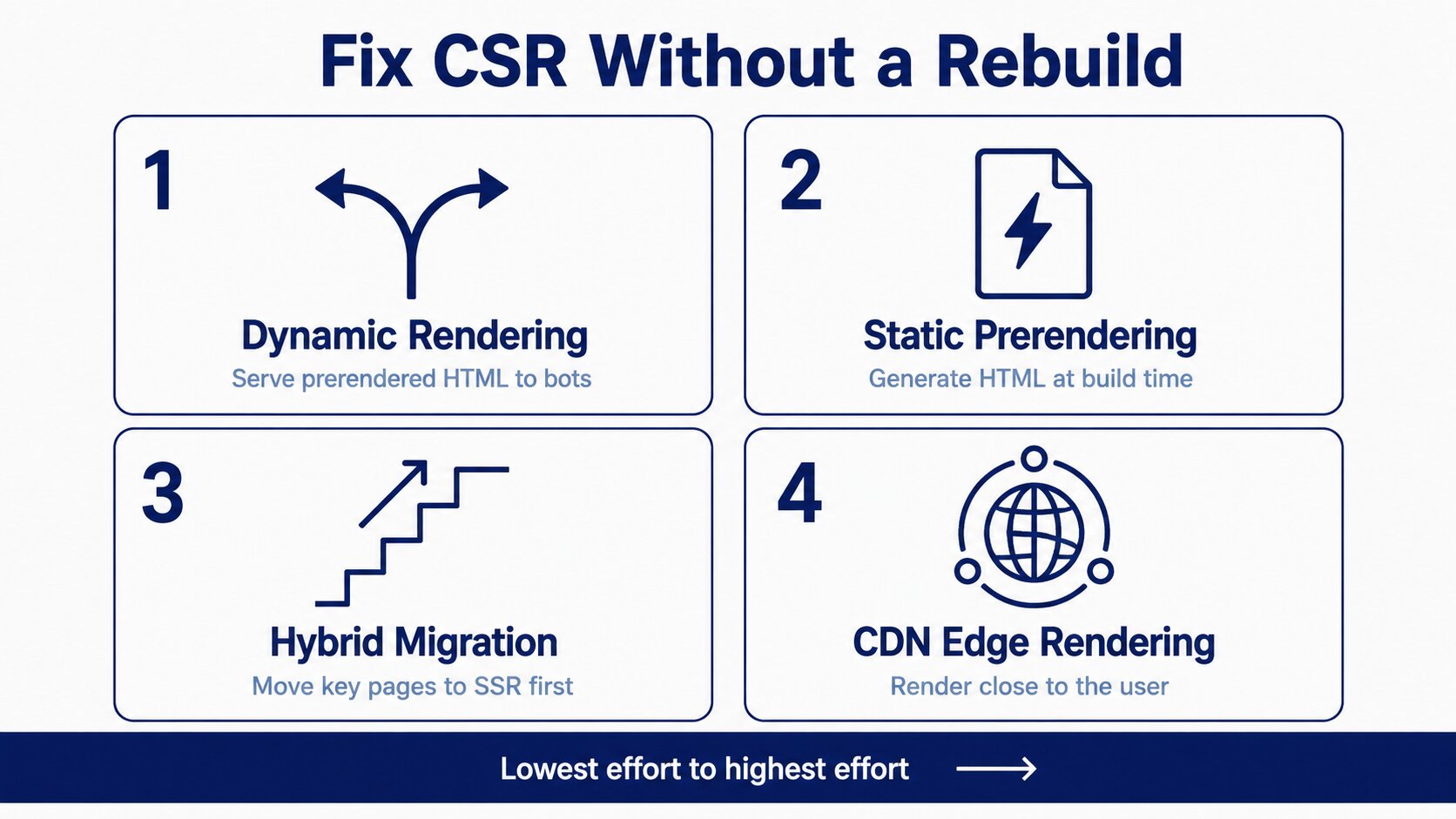
1. Implement Dynamic Rendering
Dynamic rendering is a practical middle ground for legacy single-page applications. With this approach, your web server detects who is requesting the page by checking the User-Agent header. When a standard human visitor requests a page, the server sends the standard CSR JavaScript bundle. When a search engine bot or LLM crawler arrives, your server routes the request through a headless browser service such as Prerender.io or Rendertron.
This service generates the complete HTML on the fly and returns a pre-rendered, static snapshot to the crawler. Achieving dynamic rendering react seo success becomes straightforward because search bots read your complete DOM instantly while your existing frontend codebase remains untouched for real users.
2. Leverage Static Prerendering at Build Time
If your website contains static or infrequently updated content such as blogs, landing pages, or documentation, build-time prerendering is an ideal solution. Tools like Prerender.js or plugins integrated into build tools like Webpack capture your pages during the deployment process and export fully formed HTML files.
This completely removes the need for dynamic JavaScript execution on the initial page load. Search engines receive clean HTML immediately, while users still enjoy interactive single-page application functionality once the client-side JavaScript bundle finishes downloading in the background.
3. Transition to Hybrid Rendering Gradually
You do not need to convert every single route on your application to server-side rendering overnight. Modern web frameworks allow incremental adoption. For instance, if your platform uses React, you can migrate key search-critical landing pages and product catalogues to Next.js while keeping internal user dashboards on pure CSR.
Executing react server side rendering seo strategically on high-value organic pages allows you to optimise crawling efficiency with minimal development overhead. This approach also lets developers handle React hydration selectively, ensuring the server delivers visible HTML first and attaches interactive event listeners afterwards.
4. Deploy CDN Edge Rendering
Modern Content Delivery Networks such as Cloudflare Workers or AWS Lambda@Edge allow you to execute serverless logic at the network edge, closer to your users. You can configure edge workers to fetch your raw CSR pages, render them into HTML, and cache the compiled result near the user and search crawler.
Edge rendering offloads computation from your origin server, bypasses heavy framework migrations, and guarantees fast HTML delivery to search crawlers across the globe.
Conclusion
Rendering is rarely a straight choice between CSR and SSR. Most websites end up somewhere in between, and the real decision is which templates need to reach crawlers as complete HTML and which ones can safely stay client-side. Get that split wrong on your revenue pages and the ranking loss shows up slowly, long after the code has shipped.
The problem is that rendering issues do not announce themselves. Your pages load fine in a browser, analytics looks normal, and nothing appears broken until impressions quietly flatten. A technical audit from a trusted SEO company like AONE SEO Service, shows you exactly what Googlebot and AI crawlers receive on every template, not what your browser renders. Our SEO services in India cover the full path from render diagnosis to implementation, so the fix does not stall between your SEO team and your developers.
Whether you are running a React application that has never been indexed properly or planning a migration to server-side rendering, getting expert eyes on your setup early is far cheaper than recovering lost rankings later. Contact us today or call us on +91 81011 18111 for a complete rendering and technical SEO audit of your website.
FAQ
What is SSR in SEO?
Server-side rendering (SSR) is a technique where a website generates the complete HTML page on the server before sending it to the user’s browser. This allows search engines to access the page’s content, links, and metadata immediately, making it easier to crawl and index.
Why is SSR good for SEO?
SSR is good for SEO because it delivers important content directly in the initial HTML response instead of relying on JavaScript to load it later. This helps search engines discover and index pages faster while reducing the risk of rendering issues.
Is CSR or SSR better for SEO?
In most cases, SSR is better for SEO because search engines and AI crawlers can access content immediately without executing JavaScript. CSR can still work for highly interactive web applications, but static pages such as blogs, landing pages, and product pages generally perform better with SSR.
Why is SSR faster than CSR?
SSR often feels faster because users receive a fully rendered page immediately. With CSR, the browser must first download and execute JavaScript before displaying the content. By moving most of the rendering work to the server, the initial page load speed and key performance metrics like First Contentful Paint (FCP) and Largest Contentful Paint (LCP) are significantly improved.